
WSL:【FTP接続】する方法(Ubuntu)
目次
確認
インストールされているものを確認
which ftp
ls -l /usr/bin/ftp
$ which ftp /usr/bin/ftp $ ls -l /usr/bin/ftp lrwxrwxrwx 1 root root 21 Apr 23 2020 /usr/bin/ftp -> /etc/alternatives/ftp
- 接続ができるものだけ
FTPデーモンの確認
ss -atn$ ss -atn State Recv-Q Send-Q Local Address:Port Peer Address:Port Process LISTEN 0 128 0.0.0.0:22 0.0.0.0:* LISTEN 0 128 127.0.0.1:6010 0.0.0.0:* LISTEN 0 128 [::]:22 [::]:* LISTEN 0 128 [::1]:6010 [::]:* ESTAB 0 0 [::1]:22 [::1]:49202 ESTAB 0 0 [::1]:49202 [::1]:22
- 21番ポートはLISTENしていない
- つまり、現時点では外部からFTP接続できない
インストール
インストール前確認
apt list|grep ftp$ apt list|grep ftp WARNING: apt does not have a stable CLI interface. Use with caution in scripts. erlang-ftp/focal 1:22.2.7+dfsg-1 amd64 erlang-tftp/focal 1:22.2.7+dfsg-1 amd64 ftp/focal,now 0.17-34.1 amd64 [installed,automatic] lftp/focal 4.8.4-2build3 amd64 openssh-sftp-server/focal,now 1:8.2p1-4 amd64 [installed] python3-txtftp/focal 0.1~bzr47-0ubuntu4 all tftp-hpa-dbg/focal 5.2+20150808-1ubuntu4 amd64 tftp-hpa/focal 5.2+20150808-1ubuntu4 amd64 tftpd-hpa/focal 5.2+20150808-1ubuntu4 amd64 vsftpd-dbg/focal 3.0.3-12 amd64 vsftpd/focal 3.0.3-12 amd64
- vsftpをインストールする
インストールリスト更新(最初なら)
apt-get update$ apt-get update Reading package lists... Done E: Could not open lock file /var/lib/apt/lists/lock - open (13: Permission denied) E: Unable to lock directory /var/lib/apt/lists/ W: Problem unlinking the file /var/cache/apt/pkgcache.bin - RemoveCaches (13: Permission denied) W: Problem unlinking the file /var/cache/apt/srcpkgcache.bin - RemoveCaches (13: Permission denied) (base) futa@DESKTOP-VNHH7QE:/etc/alternatives$ sudo apt-get update Get:1 http://archive.ubuntu.com/ubuntu focal InRelease [265 kB] Get:2 http://security.ubuntu.com/ubuntu focal-security InRelease [114 kB] Get:3 http://security.ubuntu.com/ubuntu focal-security/main amd64 Packages [1589 kB] Get:4 http://archive.ubuntu.com/ubuntu focal-updates InRelease [114 kB] Get:5 http://archive.ubuntu.com/ubuntu focal-backports InRelease [108 kB] Get:6 http://archive.ubuntu.com/ubuntu focal/main amd64 Packages [970 kB] Get:7 http://security.ubuntu.com/ubuntu focal-security/main Translation-en [269 kB] Get:8 http://security.ubuntu.com/ubuntu focal-security/main amd64 c-n-f Metadata [10.6 kB] Get:9 http://security.ubuntu.com/ubuntu focal-security/restricted amd64 Packages [1051 kB] Get:10 http://archive.ubuntu.com/ubuntu focal/main Translation-en [506 kB] Get:11 http://archive.ubuntu.com/ubuntu focal/main amd64 c-n-f Metadata [29.5 kB] Get:12 http://archive.ubuntu.com/ubuntu focal/universe amd64 Packages [8628 kB] Get:13 http://security.ubuntu.com/ubuntu focal-security/restricted Translation-en [149 kB] Get:14 http://security.ubuntu.com/ubuntu focal-security/restricted amd64 c-n-f Metadata [572 B] Get:15 http://security.ubuntu.com/ubuntu focal-security/universe amd64 Packages [708 kB] Get:16 http://security.ubuntu.com/ubuntu focal-security/universe Translation-en [127 kB] Get:17 http://security.ubuntu.com/ubuntu focal-security/universe amd64 c-n-f Metadata [14.6 kB] Get:18 http://security.ubuntu.com/ubuntu focal-security/multiverse amd64 Packages [22.2 kB] Get:19 http://security.ubuntu.com/ubuntu focal-security/multiverse Translation-en [5376 B] Get:20 http://security.ubuntu.com/ubuntu focal-security/multiverse amd64 c-n-f Metadata [512 B] Get:21 http://archive.ubuntu.com/ubuntu focal/universe Translation-en [5124 kB] Get:22 http://archive.ubuntu.com/ubuntu focal/universe amd64 c-n-f Metadata [265 kB] Get:23 http://archive.ubuntu.com/ubuntu focal/multiverse amd64 Packages [144 kB] Get:24 http://archive.ubuntu.com/ubuntu focal/multiverse Translation-en [104 kB] Get:25 http://archive.ubuntu.com/ubuntu focal/multiverse amd64 c-n-f Metadata [9136 B] Get:26 http://archive.ubuntu.com/ubuntu focal-updates/main amd64 Packages [1946 kB] Get:27 http://archive.ubuntu.com/ubuntu focal-updates/main Translation-en [352 kB] Get:28 http://archive.ubuntu.com/ubuntu focal-updates/main amd64 c-n-f Metadata [15.6 kB] Get:29 http://archive.ubuntu.com/ubuntu focal-updates/restricted amd64 Packages [1141 kB] Get:30 http://archive.ubuntu.com/ubuntu focal-updates/restricted Translation-en [162 kB] Get:31 http://archive.ubuntu.com/ubuntu focal-updates/restricted amd64 c-n-f Metadata [592 B] Get:32 http://archive.ubuntu.com/ubuntu focal-updates/universe amd64 Packages [924 kB] Get:33 http://archive.ubuntu.com/ubuntu focal-updates/universe Translation-en [208 kB] Get:34 http://archive.ubuntu.com/ubuntu focal-updates/universe amd64 c-n-f Metadata [20.9 kB] Get:35 http://archive.ubuntu.com/ubuntu focal-updates/multiverse amd64 Packages [24.5 kB] Get:36 http://archive.ubuntu.com/ubuntu focal-updates/multiverse Translation-en [7336 B] Get:37 http://archive.ubuntu.com/ubuntu focal-updates/multiverse amd64 c-n-f Metadata [592 B] Get:38 http://archive.ubuntu.com/ubuntu focal-backports/main amd64 Packages [44.8 kB] Get:39 http://archive.ubuntu.com/ubuntu focal-backports/main Translation-en [11.3 kB] Get:40 http://archive.ubuntu.com/ubuntu focal-backports/main amd64 c-n-f Metadata [976 B] Get:41 http://archive.ubuntu.com/ubuntu focal-backports/restricted amd64 c-n-f Metadata [116 B] Get:42 http://archive.ubuntu.com/ubuntu focal-backports/universe amd64 Packages [23.7 kB] Get:43 http://archive.ubuntu.com/ubuntu focal-backports/universe Translation-en [15.9 kB] Get:44 http://archive.ubuntu.com/ubuntu focal-backports/universe amd64 c-n-f Metadata [860 B] Get:45 http://archive.ubuntu.com/ubuntu focal-backports/multiverse amd64 c-n-f Metadata [116 B] Fetched 25.2 MB in 9s (2876 kB/s)
- 何度もリストの更新は不要
- 初回なら実施
インストール
sudo apt-get install vsftpd
cd /etc
ls -l|grep ftp$ sudo apt-get install vsftpd Reading package lists... Done Building dependency tree Reading state information... Done The following additional packages will be installed: ssl-cert Suggested packages: openssl-blacklist The following NEW packages will be installed: ssl-cert vsftpd 0 upgraded, 2 newly installed, 0 to remove and 275 not upgraded. Need to get 132 kB of archives. After this operation, 402 kB of additional disk space will be used. Do you want to continue? [Y/n] Y Get:1 http://archive.ubuntu.com/ubuntu focal/main amd64 ssl-cert all 1.0.39 [17.0 kB] Get:2 http://archive.ubuntu.com/ubuntu focal/main amd64 vsftpd amd64 3.0.3-12 [115 kB] Fetched 132 kB in 1s (92.3 kB/s) Preconfiguring packages ... Selecting previously unselected package ssl-cert. (Reading database ... 31836 files and directories currently installed.) Preparing to unpack .../ssl-cert_1.0.39_all.deb ... Unpacking ssl-cert (1.0.39) ... Selecting previously unselected package vsftpd. Preparing to unpack .../vsftpd_3.0.3-12_amd64.deb ... Unpacking vsftpd (3.0.3-12) ... Setting up ssl-cert (1.0.39) ... Setting up vsftpd (3.0.3-12) ... Created symlink /etc/systemd/system/multi-user.target.wants/vsftpd.service → /lib/systemd/system/vsftpd.service. invoke-rc.d: could not determine current runlevel Processing triggers for man-db (2.9.1-1) ... Processing triggers for systemd (245.4-4ubuntu3) ... $ cd /etc $ ls -l|grep ftp -rw-r--r-- 1 root root 132 May 8 2014 ftpusers -rw-r--r-- 1 root root 5850 Mar 6 2019 vsftpd.conf
- インストールできている
- Windows環境からWSLに接続を想定するためconfigは変更しない
接続
接続設定ファイルの編集
sudo cp -p vsftpd.conf vsftpd.conf.bk
ls -l vsftpd.conf*
sudo vi vsftpd.conf- バックアップ
- viで編集
- write_enable=YES
サービス起動
diff vsftpd.conf.bk vsftpd.conf
sudo service vsftpd start
ps -ef|grep vsftpd|grep -v grep$ diff vsftpd.conf.bk vsftpd.conf 31c31 < #write_enable=YES --- > write_enable=YES $ sudo service vsftpd start * Starting FTP server vsftpd [ OK ] $ ps -ef|grep vsftpd|grep -v grep root 4142 8 0 23:04 ? 00:00:00 /usr/sbin/vsftpd
- 既に起動している場合はrestart
リスンポート確認(やらなくてもいい)
telnet localhost 21$ telnet localhost 21 Trying 127.0.0.1... Connected to localhost. Escape character is '^]'. 220 (vsFTPd 3.0.3) ^] telnet> q Connection closed.
- こんな方法もある
- 表示の終了
- Ctrl+](カッコ閉じる
- 出力に「Escape character is '^]’.」と書いている)
- q+Enter
- Ctrl+](カッコ閉じる
ffftpでの接続
接続設定
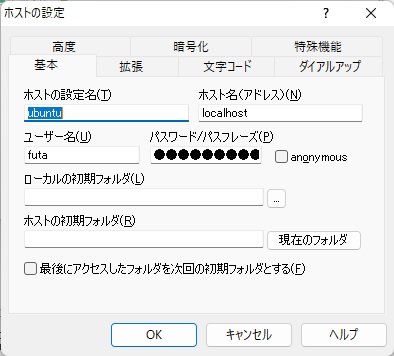
- ホストの設定名
- 接続設定を見分ける文字列(Ubuntuにした)
- ホスト名
- ローカルのWSLなので「localhost」
- ユーザ名
- WSLインストール後にUbuntuで作成したユーザ名「futa」
- パスワード
- 同じく設定したパスワード
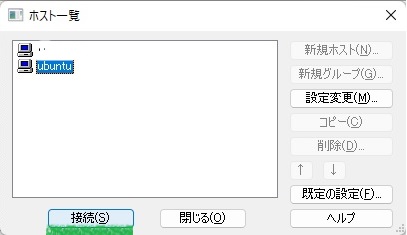
接続
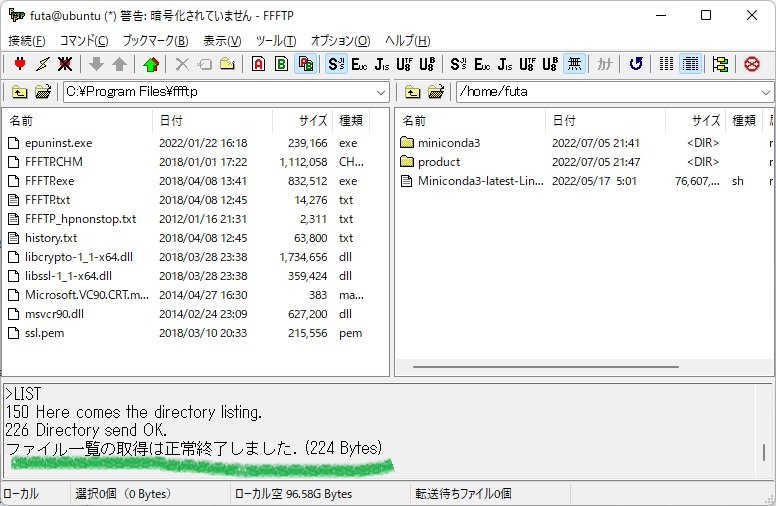
- 接続は暗号化されない